• Skip to main content
  • Skip to main navigation
Baylor University Baylor University
Paul L. Foster Success Center
  • About
    • Academic Excellence Opportunities
      • Celebration of First Year Excellence
      • Deans' Reception
    • Our Staff
  • Programs
    • Adelante
      • Adelante Beyond
    • First in Line
    • McNair Scholars
    • Major Exploration & Success Advising
    • Navigate
      • What is Navigate
    • Office of Access and Learning Accommodation
    • Pathfinders: Undergraduate Research
    • Personalized Academic Assistance
      • Study Skills Center
      • Academic Coaching
      • Academic Mentoring
      • On Demand Study Resources
    • Pre-Law
    • Student Financial Wellness
      • About Fin Well
      • Campus Resources
      • Contact Us
      • Peer Coaching
      • Presentations & Workshops
      • Tools and Resources
    • Student Support Services
      • Application
      • Contact Us
      • Eligibility
      • Services
    • Supplemental Instruction
      • What is Supplemental Instruction (SI)
      • Become an SI Leader
      • Faculty and Staff Resources
      • List of Courses Covered
      • SI Participation Guidelines
    • The Store
      • Campus Closet
      • Free Farmers Market
      • Fridge
      • Graduation Regalia
      • Pantry
      • Scrubs Program
      • Learn More About Food Insecurity at Baylor University FAQs
      • Make a Difference
      • Resources for Students Experiencing Hunger
    • Transfer Student Success
    • Tutoring
      • About the Tutoring Center
      • Courses We Serve in the Current Semester
      • Current Semester Tutoring Information
      • Departmental Tutoring
      • Group Tutoring
      • How do I get tutoring?
      • Online Study Guide Resources
      • Scheduling a Tutoring Session
      • Tutor Job Application
      • Tutoring FAQs
      • Tutoring YouTube Videos
      • Virtual Tutoring Sessions on Zoom
    • Veteran Educational and Transitional Services
  • Faculty & Staff Resources
    • Academic Progress Reports
      • Outreach Message by Progress Report Reason
    • Advising Resources
    • Navigate Faculty/Staff Information
    • Not Returning Checklist
    • NSE Instructor Resources
    • OALA Faculty Resources
    • Request a Presentation
    • SNR Submission Instructions
  • Student Resources
    • Academic Notice/Suspension
      • Reinstatement Process
      • Required Classes for Students on Academic Notice
    • Center for Global Engagement
    • Non-Returning Students
      • Not Returning Checklist
      • Planning to Leave Baylor
    • Returning Students
      • Planning To Return To Baylor
      • Planning to Register for the Next Semester
      • Study Commons Hours/Locations
    • Student Success Stories Podcast
  • Make a Gift
Baylor BU Paul L. Foster Success Center Programs Tutoring Virtual Tutoring Sessions on Zoom
  • Adelante
  • First in Line
  • McNair Scholars
  • Major Exploration & Success Advising
  • Navigate
  • Office of Access and Learning Accommodation
  • Pathfinders: Undergraduate Research
  • Personalized Academic Assistance
  • Pre-Law
  • Student Financial Wellness
  • Student Support Services
  • Supplemental Instruction
  • The Store
  • Transfer Student Success
  • Tutoring
    • About the Tutoring Center
    • Courses We Serve in the Current Semester
    • Current Semester Tutoring Information
    • Departmental Tutoring
    • Group Tutoring
    • How do I get tutoring?
    • Online Study Guide Resources
    • Scheduling a Tutoring Session
    • Tutor Job Application
    • Tutoring FAQs
    • Tutoring YouTube Videos
    • Virtual Tutoring Sessions on Zoom
  • Veteran Educational and Transitional Services

Virtual Tutoring Sessions on Zoom

All Baylor Tutoring is normally in person, but on occasion, some sessions can be offered virtually.  Some examples of that include:

  • Summer Tutoring 
  • Inclement Weather Tutoring *** NOTE: Since campus will be closed to in-person services on January 26th, the Tutoring Center will delay opening until until the date and time that in-person services resume.  If you had a previously scheduled in-person appointment scheduled on a date we will be closed, then email us if you wish for us to change your appointment to a virtual appointment served on zoom.  We will do our best to accommodate you with available resources.  Otherwise, your appointment will be cancelled and you can reschedule with us when our front desk is open and in-person services resume.

How to Schedule an ONLINE Private Tutoring Appointment

Steps for scheduling an online tutoring appointment in the Navigate app:

Open your Navigate app and select "Appointments".
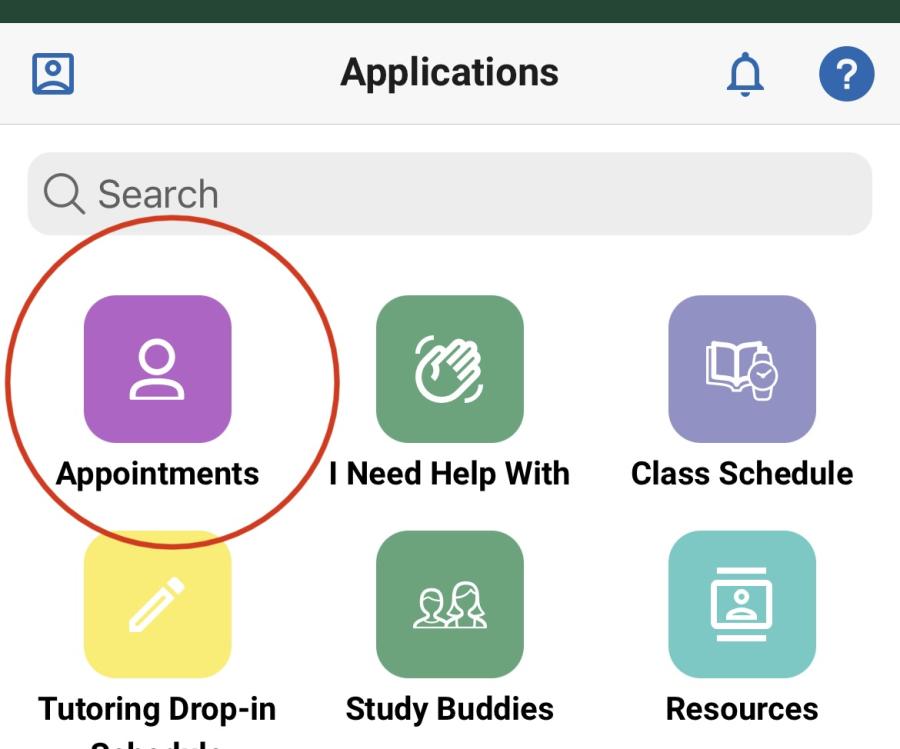
Step 1 to scheduling a tutoring appointment in the Navigate app.


Click the blue button that reads "Schedule an Appointment or Drop-in Online".

Step 2 for scheduling an online tutoring appt.


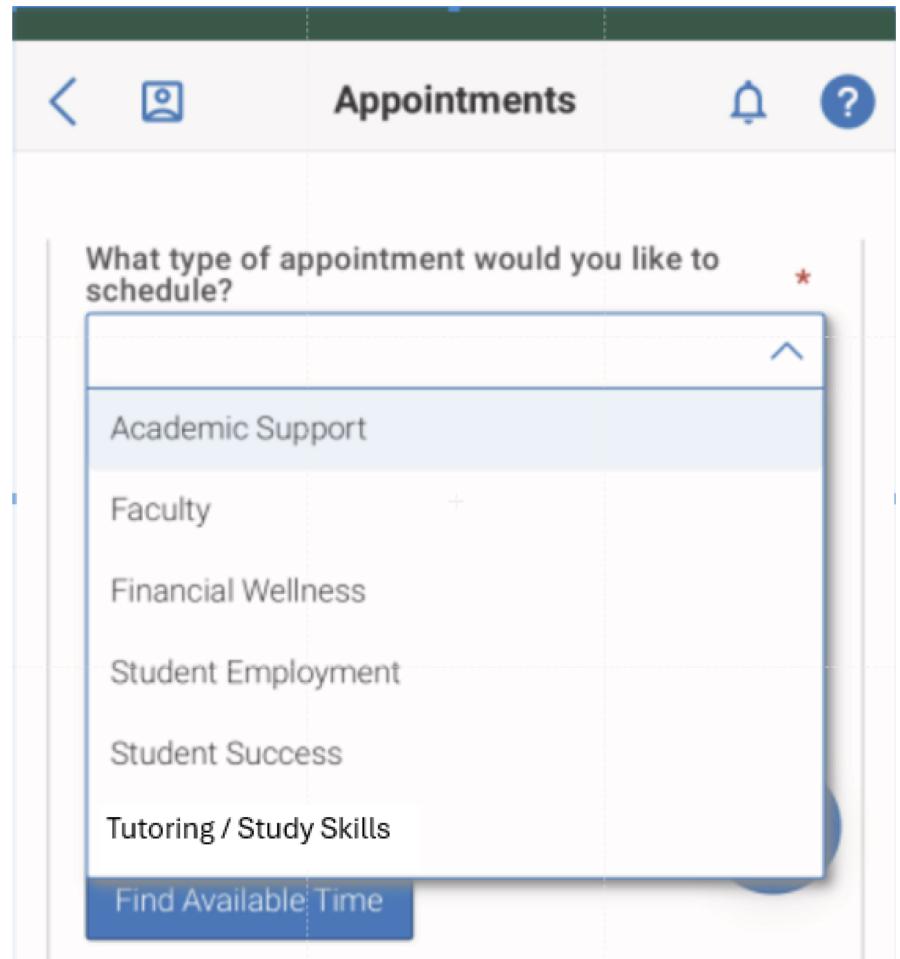
Under "What type of appointment would you like to schedule?", select "Tutoring".

step 3 for scheduling online tutoring


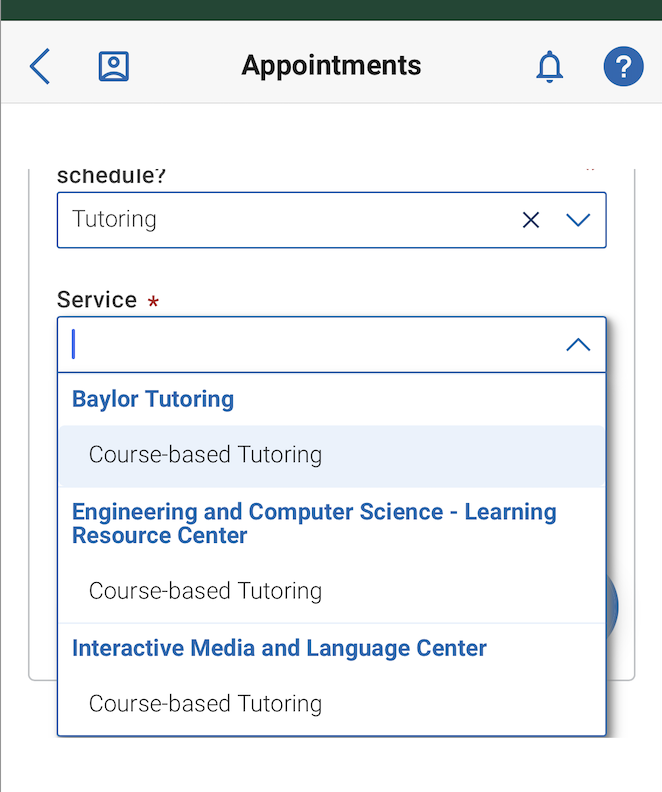
Under "Service", select "Course-based tutoring".

Then, select the date you would like to schedule your appointment for and click "Find Available Times".


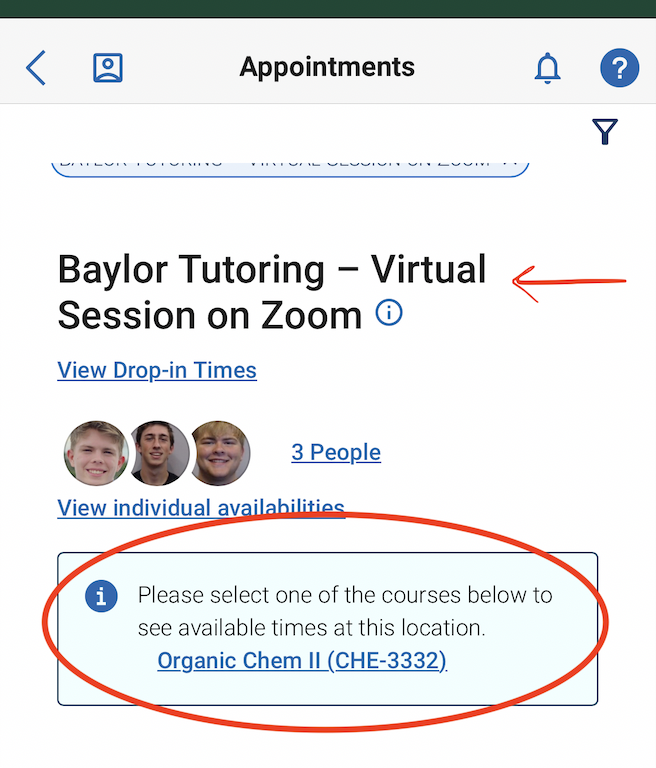
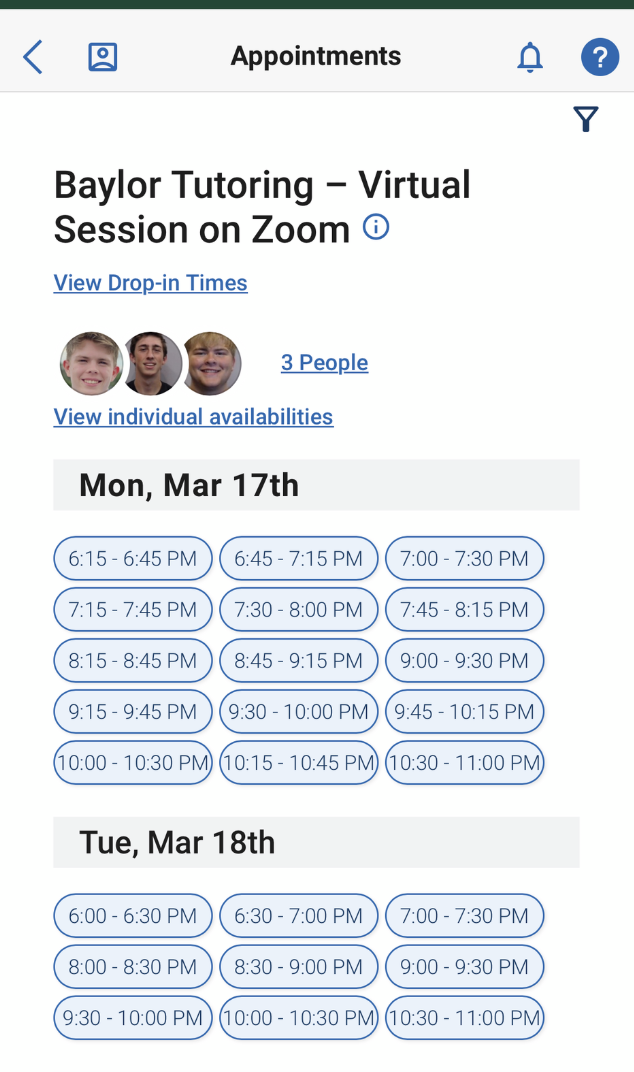
Scroll to the heading that reads "Baylor Tutoring - Virtual Tutoring on Zoom" when prompted, rather than "Baylor Tutoring: Sid Richardson, 1st Floor, Tutoring Center", which is the location for in-person appointments.

Select the course for which you would like to schedule an online appointment.

For example, in the image to the right, the student would click the hyperlink for CHE-3332. 
 

Next, when a screen pops up, select the corresponding date and time for when you would like to schedule your online appointment. 
 

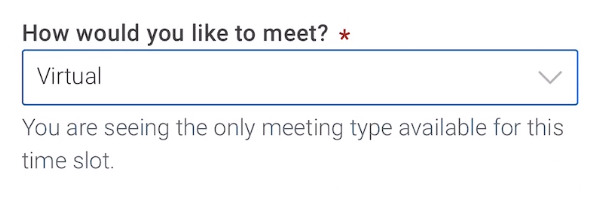
When asked "How would you like to meet?", select "Virtual".
 

Once you are comfortable with the date, time, location, and tutor you have selected, be sure to click "Schedule" so that your appointment saves.

  • If you have completed all of the steps correctly, you will receive a confirmation email through the Navigate scheduling system.
  • If you are unsure whether you have completed this process correctly, please contact us and our front desk staff will assist you.
  • If within business hours (M-Th, 9 am - 8 pm), please call us at 254-710-4135
  • If outside of business hours, please email us at tutoringinfo@baylor.edu 

PRIOR TO THE START OF YOUR SESSION, be sure you have accomplished the following:

  • To get Zoom, log in with your Baylor credentials by selecting "Sign in." You will need to sign in with DUO.  If you have difficulty, please reach out the Baylor Helpdesk 254-710-4357.
  • You should have a email from your tutor with a link to your session.  Click that link to enter the session.  If you have difficulty, please reach out the Tutoring Center front desk to help you.  You can reach the Tutoring Center front desk by emailing TutoringInfo@baylor.edu .
  • Gather your course materials, (notes, online textbook, canvas course instructions, etc.) and have them accessible during your session.  If you have never used Zoom before, have a friend download the app as well and practice using the app.  The PDF linked below has some helpful hints about how to use the tools within a video call.

On the date and time of your tutoring appointment:

  • Be in front of your computer with Zoom open and ready to join your meeting.
  • Click for a PDF that contains some illustrated steps of tools you can use during the session on Zoom. 
  • Please be patient if the previous appointment ended a few minutes late.  Tutors will do their best to end a a previous session on time so they can address the next waiting appointment.
  • Have a great session!

______________________________________________________________

In the unlikely event you cannot log into Zoom 

and need to attend your tutoring session via Microsoft Teams, please confirm with your tutor that you will need to meet via Microsoft Teams. Once you have confirmation from the Tutoring Center that your session will be in Microsoft Teams, follow the directions below:

  • Log into Office365 & once in Office 365, download Microsoft Teams from the suite of applications listed. For instructions on how to use Microsoft Teams, refer to any of these video tutorials.
  • Once you have downloaded Microsoft Teams, gather your course materials, (notes, online textbook, canvas course instructions, etc.) and have them accessible during your session.  If you have never used Microsoft Teams before, have a friend download the app as well and practice using the app.  The PDF linked below has some helpful hints about how to use the tools within a video call.
  • On the date and time of your tutoring appointment:
  • Be in front of your computer with Microsoft Teams open and ready to receive your “video call.”
  • Your tutor will place a “video call” to you at the start of your session using your email address in Microsoft Teams.  You do not need to call them, they will call you as close to your start time as possible. Please be patient if the previous appointment ended a few minutes late.  Tutors will do their best to end a call on time so they can address the next waiting appointment.
  • Select the video camera icon to accept the video call.
  • You will be connected to your tutor!  Have a great session!
  • Click PDF that contains some illustrated steps of tools you can use during the session on Microsoft Teams. 

More Information

If you have any additional questions about tutoring, please contact our front desk at Tutoringinfo@Baylor.edu or our the Tutoring Coordinator, Melanie_Briscoe@baylor.edu.

Paul L. Foster Success Center

Sid Richardson Building

Success_Center@baylor.edu
(254) 710-8212
Baylor BU Paul L. Foster Success Center Programs Tutoring Virtual Tutoring Sessions on Zoom
  • About
    Back
    • Academic Excellence Opportunities
      Back
      • Celebration of First Year Excellence
      • Deans' Reception
    • Our Staff
  • Programs
    Back
    • Adelante
      Back
      • Adelante Beyond
        Back
        • Adelante Beyond Application
    • First in Line
    • McNair Scholars
    • Major Exploration & Success Advising
    • Navigate
      Back
      • What is Navigate
        Back
        • Navigate Student
        • Navigate Faculty/Staff Information
          Back
          • Faculty Mentors
          • A-Z Training Documents
            Back
            • Analytics
            • Appointments
            • Communication
            • Scheduling
            • Student Profile
            • Success Indicators
          • Navigate Training
        • Navigate Report Form
        • Navigate App User Experience Videos
        • Navigate Usage at Baylor
          Back
          • Navigate Usage at Baylor - Fall 2022
          • Navigate Usage at Baylor - Spring 2023
    • Office of Access and Learning Accommodation
    • Pathfinders: Undergraduate Research
    • Personalized Academic Assistance
      Back
      • Study Skills Center
        Back
        • Scheduling a Study Skills Center Appointment
        • Meet the Study Skills Center Academic Coaches!
      • Academic Coaching
      • Academic Mentoring
        Back
        • Meet the Academic Mentors!
      • On Demand Study Resources
    • Pre-Law
    • Student Financial Wellness
      Back
      • About Fin Well
      • Campus Resources
        Back
        • One Stop Student Financial Services
        • Scholarships
        • Student Employment
        • Textbook Resources
        • The Store
      • Contact Us
      • Peer Coaching
      • Presentations & Workshops
      • Tools and Resources
        Back
        • Budget-Track-Budget
        • Credit
        • Reasons to Use a Credit Card
        • Undergrad Student Loans Cheat Sheet
    • Student Support Services
      Back
      • Application
      • Contact Us
      • Eligibility
      • Services
    • Supplemental Instruction
      Back
      • What is Supplemental Instruction (SI)
      • Become an SI Leader
      • Faculty and Staff Resources
      • List of Courses Covered
      • SI Participation Guidelines
    • The Store
      Back
      • Campus Closet
      • Free Farmers Market
      • Fridge
      • Graduation Regalia
      • Pantry
      • Scrubs Program
      • Learn More About Food Insecurity at Baylor University FAQs
      • Make a Difference
        Back
        • Donate Food or Organize a Food Drive
        • Donate Unused Guest Meal Swipes
        • Make a Financial Gift
        • Stay Up-to-Date
        • Volunteer at The Store
      • Resources for Students Experiencing Hunger
        Back
        • Bear Swipe Share
        • How do I know if I am Food Insecure?
          Back
          • Student Self Assessment
        • SNAP Application Assistance
    • Transfer Student Success
    • Tutoring
      Back
      • About the Tutoring Center
      • Courses We Serve in the Current Semester
      • Current Semester Tutoring Information
      • Departmental Tutoring
      • Group Tutoring
      • How do I get tutoring?
      • Online Study Guide Resources
        Back
        • Accounting
        • Biochemistry
        • Biology
        • Calculus
        • Computer Science
        • Economics
        • General Chemistry
        • Genetics
        • Human Anatomy
        • Neuroscience
          Back
          • Neuroscience Past Semesters
        • Organic Chemistry
        • Physics
        • Pre-Calculus
        • Statistics
        • Religion
        • Human Physiology
      • Scheduling a Tutoring Session
      • Tutor Job Application
        Back
        • Faculty Recommendation Form
        • Tutor Application
      • Tutoring FAQs
      • Tutoring YouTube Videos
        Back
        • Accounting
        • Biology
        • Biology 2
        • Calculus (MTH 1321)
        • Computer Science 1 (CSI 1430)
        • Physics
        • Genetics
        • Organic Chemistry
        • Pre-Calculus (MTH 1320)
      • Virtual Tutoring Sessions on Zoom
    • Veteran Educational and Transitional Services
  • Faculty & Staff Resources
    Back
    • Academic Progress Reports
      Back
      • Outreach Message by Progress Report Reason
    • Advising Resources
    • Navigate Faculty/Staff Information
    • Not Returning Checklist
    • NSE Instructor Resources
    • OALA Faculty Resources
    • Request a Presentation
    • SNR Submission Instructions
  • Student Resources
    Back
    • Academic Notice/Suspension
      Back
      • Reinstatement Process
      • Required Classes for Students on Academic Notice
    • Center for Global Engagement
    • Non-Returning Students
      Back
      • Not Returning Checklist
      • Planning to Leave Baylor
    • Returning Students
      Back
      • Planning To Return To Baylor
      • Planning to Register for the Next Semester
      • Study Commons Hours/Locations
    • Student Success Stories Podcast
  • Make a Gift
  • General Information
  • Academics & Research
  • Administration
  • Admissions
  • Gateways for ...
  • About Baylor
  • Athletics
  • Ask Baylor
  • Bookstore
  • Calendar
  • Campus Map
  • Directory
  • Give to Baylor
  • News
  • Search
  • Social Media
  • Strategic Plan
  • College of Arts & Sciences
  • Diana R. Garland School of Social Work
  • George W. Truett Theological Seminary
  • Graduate School
  • Hankamer School of Business
  • Honors College
  • Law School
  • Louise Herrington School of Nursing
  • Moody School of Education
  • Research at Baylor University
  • Robbins College of Health and Human Sciences
  • School of Engineering & Computer Science
  • School of Music
  • University Libraries, Museums, and the Press
  • More Academics
  • Athletics
  • Compliance, Risk and Safety
  • Human Resources
  • Marketing and Communications
  • Office of General Counsel
  • Office of the President
  • Office of the Provost
  • Operations, Finance & Administration
  • Senior Administration
  • Student Life
  • University Advancement
  • Undergraduate Admissions
  • goBAYLOR
  • Graduate Admissions
  • Baylor Law School Admissions
  • Social Work Graduate Programs
  • George W. Truett Theological Seminary Admissions
  • Online Graduate Professional Education
  • Virtual Tour
  • Visit Campus
  • Alumni & Friends
  • Faculty & Staff
  • Online Graduate Professional Education
  • Parents
  • Prospective Faculty & Staff
  • Prospective Students
  • Students
  • Anonymous Reporting
  • Annual Fire Safety and Security Notice
  • Cost of Attendance
  • Digital Privacy
  • Legal Disclosures
  • Mental Health Resources
  • Notice of Non-Discrimination
  • Report It
  • Title IX
  • Web Accessibility
 
Baylor University
Copyright © Baylor® University. All rights reserved.
Baylor University • Waco, Texas 76798 • 1-800-229-5678